UX/UI DESIGN for Self Checkout Kiosks
Transparent Savings Display on Self-Checkout Kiosks
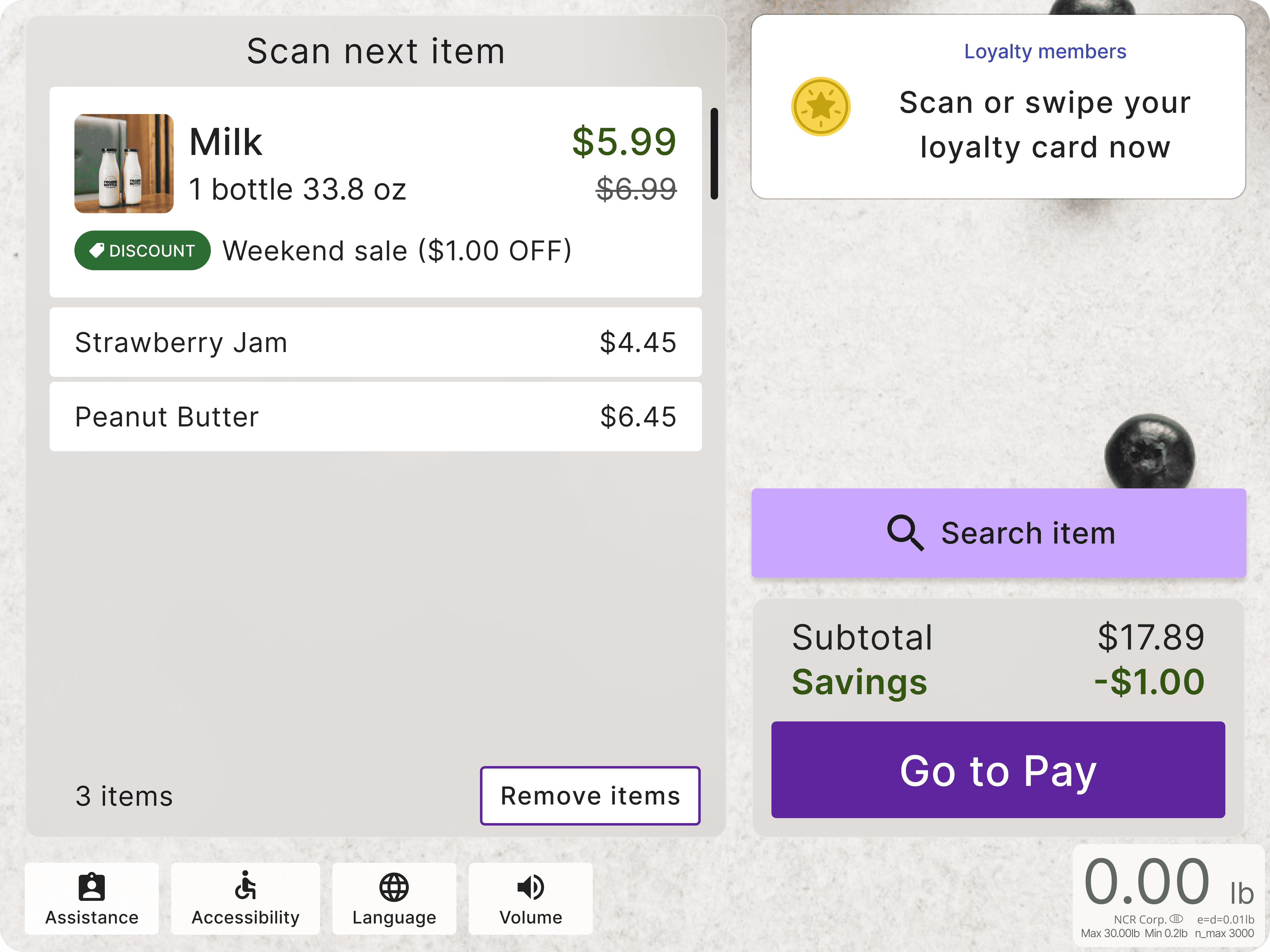
Sainsbury's Self-Checkout Savings Display focused on optimizing how savings information is displayed to shoppers during self-checkout, with the goal of improving user satisfaction and transparency in the shopping experience.
Team
1 UX Researcher/Designer, 1 Project Manager, & Sainsbury's
Tools & Skills
Figma
User-Centered Design Thinking, Usability Testing with UserTesting.com, Prototyping
Duration
3 Weeks
Sainsbury’s requested to hide $0.00 savings unless applicable. The main challenge was to decide whether or not to display $0.00 savings information at self-checkout kiosks. The key questions included:
📌 Perspective of $0.00 Savings
To evaluate whether displaying $0.00 savings provides meaningful benefits to users and understand why shoppers may or may not want to see $0.00 savings displayed at all times
📌 User Satisfaction of Savings
To measure user satisfaction with savings presentation and determine at what point in the checkout process users expect to see their total savings displayed
📌 Future Improvements
To identify potential improvements in the savings display interface that could enhance the shopping experience
The research was conducted through iterative usability testing with 15 UK shoppers who always or often use self-checkout while shopping with ages ranging from 21 - 45. The process included:
🎯 Initial Testing (Phase 1)
Tested two prototypes:
Prototype 1: Always showing $0.00 savings
Prototype 2: Hiding $0.00 savings until applicable
🎯 User Testing Results (Phase 1)
Prototype 1 - Always showing $0.00 savings:
3 out of 5 users found $0.00 savings beneficial as it was a visual indicator/reminder of their savings
2 out of 5 users found $0.00 savings confusing and potentially negative
For the color, users enjoyed the green color of the font as it is associated with money
Prototype 2 - Hiding $0.00 savings until applicable:
3 out of 5 users found $0.00 savings beneficial as the possibility of avoiding confusion if shoppers are expecting to see savings on certain items
2 out of 5 users found $0.00 savings as unnecessary information
For the color, users enjoyed the green color of the font as it is associated with money
🎯 Design Iteration
Created a new prototype based on user feedback
Prototype 3: Always showing savings with enhanced visual emphasis when applicable
Implemented bold green text for active savings
Maintained standard black text for $0.00 savings
🎯 Further User Testing (Phase 2)
Prototype 3 - $0.00 savings are always shown and emphasized when applied:
4 out of 5 users found $0.00 savings beneficial for forecasting and saving expectations
4.4 out of 5 rating for noticeability and satisfaction
For the bold green color, users confirmed the bold, green presentation enhanced visibility. Stronger positive reception to the enhanced display.
The final recommendation was to show $0.00 savings as simple black text and convert it to bold green text when savings become applicable become applicable. This solution was chosen because:
😌 Visual Clarity
Clear differentiation between active and inactive savings
Enhanced visibility of actual savings
Reduced confusion about savings status
😌 User Benefits
Helps shoppers predict upcoming savings
Provides system functionality confirmation
Creates clear expectations about savings opportunities
Encourages engagement with savings opportunities
Prototype 3 (Emphasis) - $0.00 savings are always shown and emphasized when applied